Connecting to Hosts
Once you have set up an SSH username and public key and you have registered hosts in SSH Connect, you are ready to connect using SSH Gateway.
Examples below are written for the OpenSSH
suite of command-line tools (ssh, scp, and sftp). These tools are
installed by default on Mac, Linux, and Windows
WSL2 .
Connection basics
When connecting to SSH Gateway, you will use a connection string that
incorporates your SSH username, the name of the SSH connect host you are
trying to connect to, and ssh.webscale.com, joined together with @
symbols.
Use the hostname shown on the SSH Connect drawer, not the DNS hostname for the server.
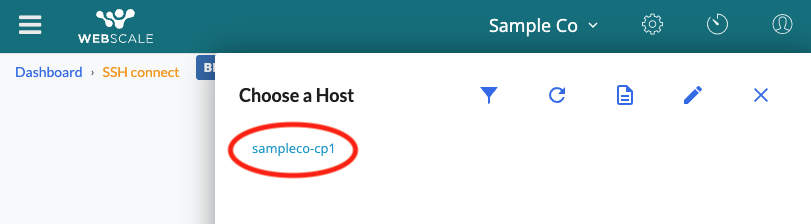
For instance, for a user with the SSH username joesample, who is trying to
connect to a host that is named sampleco-cp1, the connection string would look
like:
joesample@sampleco-cp1@ssh.webscale.com
SSH for login and remote exec
You can open a login shell to a host using SSH Gateway and the ssh command:
ssh joesample@sampleco-cp1@ssh.webscale.com
If you would like to execute a command on the remote server, you can append it
to the ssh command as usual. For instance, to run ps -aux on the server
and see its output locally, run:
ssh joesample@sampleco-cp1@ssh.webscale.com ps -aux
Transferring files with SCP
You can transfer files to and from your local computer using the scp command.
To copy a file called data.json from the server to your local machine, run:
scp joesample@sampleco-cp1@ssh.webscale.com:data.json .
To copy the file from your local directory to the remote server, run:
scp data.json joesample@sampleco-cp1@ssh.webscale.com:
Transferring files with SFTP
The sftp command can be used to interactively transfer files to and from
the server, using subcommands similar to the historical ftp program.
The exact usage of sftp is out of scope for this document, but you can connect
to a host using:
sftp joesample@sampleco-cp1@ssh.webscale.com
SSH for local port forwarding
The ssh command can securely forward traffic from a local network port to a
port on a remote server. This allows, for instance, connecting to a remote
database using local tools.
For example, a user with MySQL DB running on port 3306 on a remote server could make that traffic available on port 5000 of his local computer like this:
ssh -N -L 5000:localhost:3306 joesample@sampleco-cp1@ssh.webscale.com
And then connect to it locally, for example using the mysql command line tool:
mysql -h 127.0.0.1 -P 5000 -u <username> -p
Conclusion
SSH Gateway gives access to remote hosts using the industry standard SSH protocol. It does not require the use of a browser like SSH Connect does, and unlocks features like file transfers, port forwarding, and remote command execution. Use it for convenient access to your servers and data inside the Webscale cloud.